


Synology DS207+ NAS Server

Testing
In order to test the Synology DS207+, I kept the testing process extremely simple and focused primarily on network transfer speed between the NAS itself and the client PC. All testing was conducted from within a closed network scenario in order to reduce network overheads affecting the performance of the DS207+. Unfortunately, I was unable to secure access to a Gigabit switch in time for the review to assess the Gigabit capabilities of the unit, but the numbers that I managed to obtain are, in my opinion, accurate and qualitative.
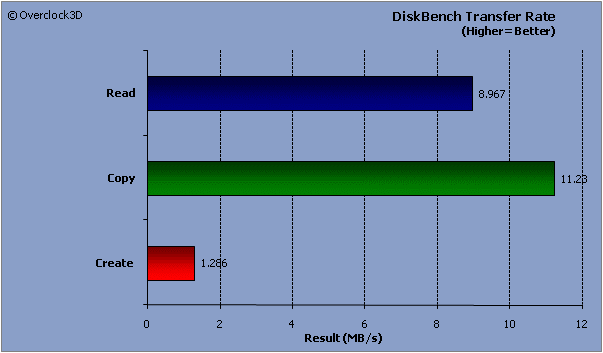
The Synology DS207+ will be assessed using a freshly formatted RAID 0 array, while Nodesoft’ freeware DiskBench and Intel’ Iometer (Intel Open Source License) will be used to assess the Synology DS207+’ disk performance. DiskBench is a handy little benchmarking utility that should give an indication of real life performance instead of synthetic numbers. Three tests were performed using DiskBench: read, copy and create. The read, copy and create benchmarks were all undertaken using a 500MB file.
Iometer is an I/O subsystem measurement and characterization tool for single and clustered systems. It’s a useful tool to test disk performance and can measure the I/O transfer rate and the average I/O response time. The ‘All in one’ test was run for ten minutes and the results have been presented below for you:

From the Iometer results chart above, we can see that ‘Maximum I/O Response Time’ is very high, but yet the ‘average’ is quite reasonable.
The low CPU Utilization figure is a welcome sight too. We can see from the DiskBench charts below that the Synology DS207+ provided satisfactory file transfer rates and times for both the read and copy benchmarks.
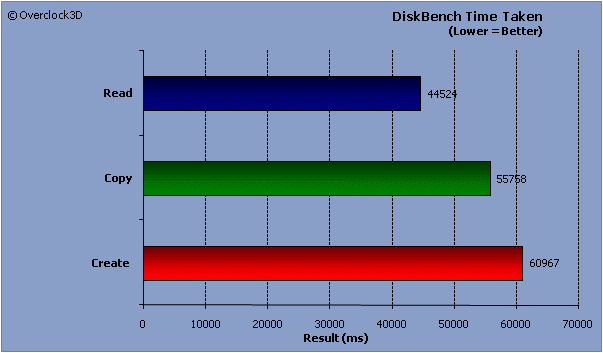
However, the ‘create’ benchmark causes a significant slowdown in disk performance, and the bottom chart illustrates this the best.
All things considered, the Synology DS207+ has handled itself quite respectably. Let’s head over the page to see what we can draw from the conclusion…
