Hitachi Deskstar 7K1000 Terabyte Hard Drive

HDTACH Benchmarks
Published: 9th September 2008 | Source: Hitachi | Price: £93.80 |

HDTach is a free hard disk benchmarking program from SimpliSoftware. This benchmark is not only capable of producing results on hard disk access times but also CPU usage required during disk access. The "Long bench" was run a total of 5 times with the highest and lowest results being omitted and an average calculated from the remaining 3 results.
Straight away the differences between the two drives become very apparent, with the sequential read speed being considerably higher for the Hitachi DeskStar 7K1000. Almost 10MB/s higher in fact at the start of the test.

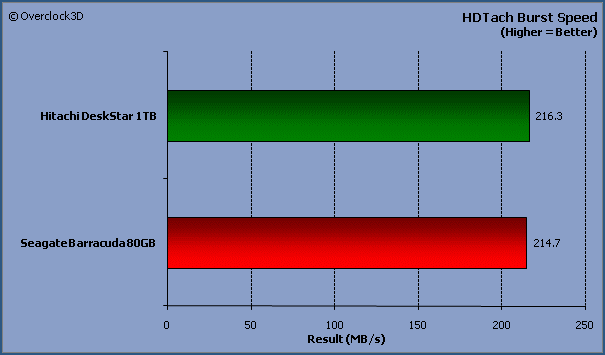
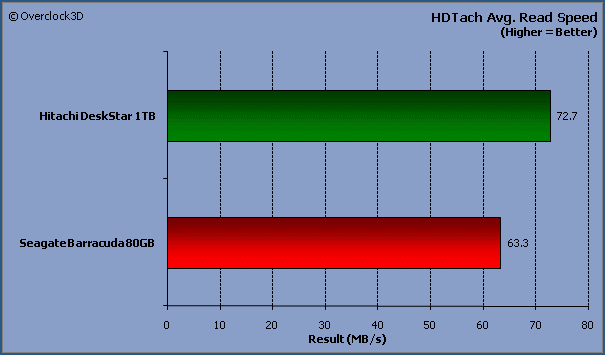
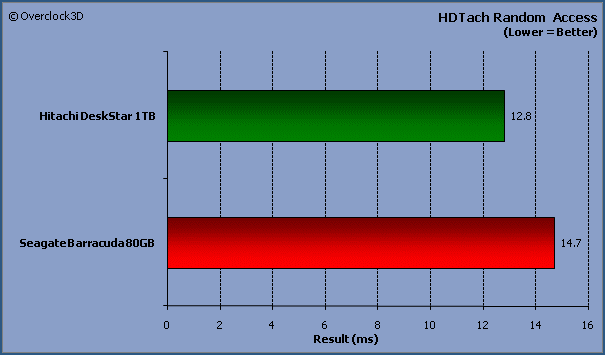
All bar the first chart show significant performance gains to the Hitachi DeskStar 7K1000 which is more than likely attributed to its increased buffer size. The Hitachi DeskStar 7K1000 also exhibits decreased latencies when compared to the Seagate Barracuda 80GB HDD
Most Recent Comments
Great review m8.
What I draw exception to on harddrives these days, and not this one in particular, is that the mounting holes on the left and right side that astride the pcb mount still do-not protect the pcb from screws being used that are too long.
To the rear of the drives (the non pcb) there is an enclosed space where the screws can draw into and then hit if they`re too long.
As an example I mounted a 1TB WDC drive, to which the makeup is almost exactly the same as this drive according to the nice pics. In moving the drive from one cage to another I happened to use case-style screws and 1 of them happened to be millimeters longer than the others. As a result it was shorting something on the non visible side of the pcb.
On boot, the mobos I tried it on (whilst keeping it in the same cage) reported "disk not reset info!" or similar, taking it out of the cage completely it went through ok, on doing so I noticed the 1 screw was that much longer than the rest - hey a case-type screw is a case-type screw.
All it requires is an enclosed area like the rear two screw-holes have and it saves a bunch of trouble. It`s not like the harddrive people always enclose screws for u, so u often delve into the "similar screws" box u have laying around.
Meh, the drives are great performers tho, can`t argue with that.
What I draw exception to on harddrives these days, and not this one in particular, is that the mounting holes on the left and right side that astride the pcb mount still do-not protect the pcb from screws being used that are too long.
To the rear of the drives (the non pcb) there is an enclosed space where the screws can draw into and then hit if they`re too long.
As an example I mounted a 1TB WDC drive, to which the makeup is almost exactly the same as this drive according to the nice pics. In moving the drive from one cage to another I happened to use case-style screws and 1 of them happened to be millimeters longer than the others. As a result it was shorting something on the non visible side of the pcb.
On boot, the mobos I tried it on (whilst keeping it in the same cage) reported "disk not reset info!" or similar, taking it out of the cage completely it went through ok, on doing so I noticed the 1 screw was that much longer than the rest - hey a case-type screw is a case-type screw.
All it requires is an enclosed area like the rear two screw-holes have and it saves a bunch of trouble. It`s not like the harddrive people always enclose screws for u, so u often delve into the "similar screws" box u have laying around.
Meh, the drives are great performers tho, can`t argue with that.
Quote:
|
Originally Posted by Rastalovich
What I draw exception to on harddrives these days, and not this one in particular, is that the mounting holes on the left and right side that astride the pcb mount still do-not protect the pcb from screws being used that are too long.
To the rear of the drives (the non pcb) there is an enclosed space where the screws can draw into and then hit if they`re too long. |
Fantastic Review PV!
Not sure who at the point in time needs 1000 odd gigs of storage but a good drive none the less.

Thanks mate for the feedback and I'm glad you enjoyed the review. Although many people probably wouldn't need 1TB of storage, it's certainly cheap enough to now
I bought 1TB of storage when I got my new rig just because it is that cheap. I maybe could fill up 500GB straight off if I was that way inclined to rip DVDs etc. On the other hand, I'm off to Uni and having near limitless amounts of disk space may be useful in the event I can't pop down to the nearby shops to buy extra HDs. (The joys of living in Manchester, so many cheap suppliers, so little time (so much rain))
Quote:
|
Originally Posted by name='PV5150'
Although many people probably wouldn't need 1TB of storage, it's certainly cheap enough to now
|

Great review btw.
5TB holy crap - now that's some storage 
Thanks for the feedback too mate, I'm glad you liked it

Thanks for the feedback too mate, I'm glad you liked it


http://www.overclock3d.net/gfx/artic...115943873s.jpg
Check the review here