Corsair Flash Voyager Port
Software Basics
Published: 12th May 2009 | Source: Corsair | Price: £19.32 |
Software Basics
There's no doubt, the Flash Voyager Port certainly looks the part, but the device itself only plays a small part in the bigger picture, and in actual fact it's the software that will really make or break the product. No matter how good the product is, if the software isn't there to back it up it simply won't work. For testing the software was installed on a machine running Vista Home Premium x64.
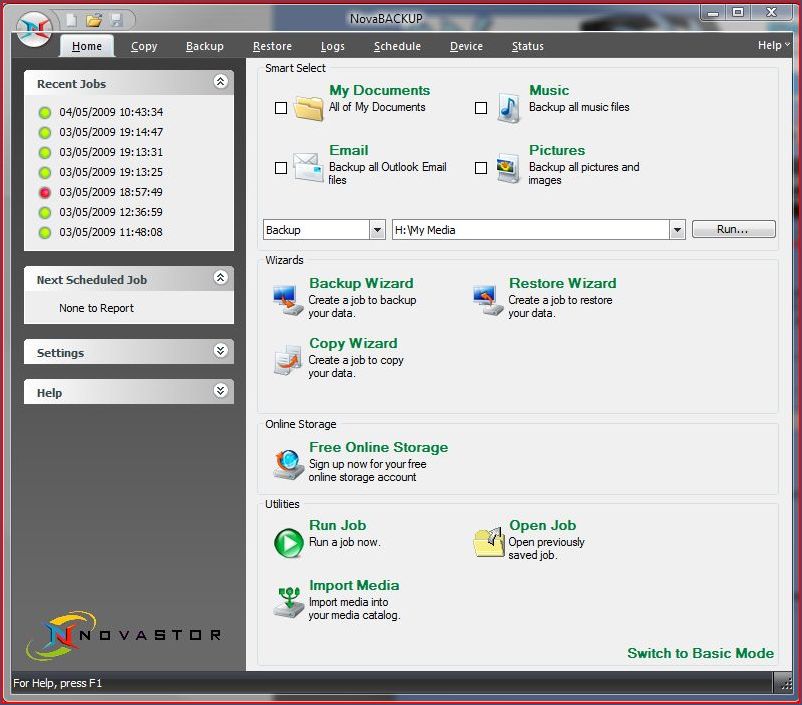
Once you have installed the software you will need to select to view in either basic or advanced mode. As the name implies, the advanced mode gives you access to additional features not available in basic mode. However, for the majority of users the basic mode would probably contain sufficient features
In the advanced mode there is a selection of tabs running along the top which allow you to access the more advanced features. From here you can make alterations to schedules, edit saved tasks, check when you last backed up and also create new tasks from scratch (without wizard).
Restoring backups is easy. You can either select the Restore tab in the advanced menu or run the Restore wizard. The Backup is saved as a single large file on the backup media, making locating simple and quick. The software also gives the file a logo, making it easy to identify, and also helping to avoid accidental deletion.
Upon startup the backup software automatically starts in the system tray. From there you can either open the software by double clicking the icon, or see if a task is running (indicated by the icon blinking). The NovaBackup Icon is the one furthest to the left in the picture.

Speed
It's quite hard to benchmark a USB dock, since the performance will almost entirely be down to the flash drive used. However, I will say that backing up to flash drives through USB is nowhere near as fast as going to an eSata, Sata or NAS drive. Transferring files to the Flash Voyager (by no means a slow flash drive) took nearly twice as long as copying to my NAS (through a 100mb/s ethernet link). Although it's not a killer, you will have to be prepared for a longer wait once the Backup has started. Here are some results from copying the 3DMark Vantage installer to the Voyager and my home Nas.
Lacie2big 500gb Home NAS connected with 100mb/s: 46.6 Seconds
Corsair Flash Voyager 32 connected with USB: 79.6 Seconds
Although transfer rates are slower with the Voyager Port, the simplicity of the software and the ease of starting your backup with the dock should save you time in the long run. Unless you run Backups at the end of the day, speed shouldn't be too much of an issue, since you can let it run in the background. If however, you do run your backups at the end of the day, time is something you will need to consider before buying. To see just how simple it is to Backup, head on over to the next page...
Most Recent Comments
Very nice product and very nice review..
Thing is I'd need a pretty hefty memory stick to be able to back up enough data.
Nice review, link to the 32GB drive is broken 
As bungral said, its not big enough, unless you used it for major backups only...

As bungral said, its not big enough, unless you used it for major backups only...
Quote:
|
Originally Posted by name='PeterStoba'
Nice review, link to the 32GB drive is broken
![]() As bungral said, its not big enough, unless you used it for major backups only... |
If It doesnt come back in stock in the next few days then Ill add a different link..
32/64gb may not seem enough, but actually, all my vital data was only a fraction of what I thought it would be.
Just buy a WD passport 160gb for £45 and use that, doesnt have to be the usb stick.
Quote:
|
Originally Posted by name='tinytomlogan'
Just buy a WD passport 160gb for £45 and use that, doesnt have to be the usb stick.
|
Relatives have one and it is awesomez
Quote:
|
Originally Posted by name='tinytomlogan'
Just buy a WD passport 160gb for £45 and use that, doesnt have to be the usb stick.
|
Yep, WD Passports go up through 500GB and are USB powered:
http://www.wdc.com/en/products/Products.asp?DriveID=525
we have one of the passports at work and it is excellent
i'm thinking of getting one for myself now
Looks amazing 
I already own a Corsair Voyager but I think ill b sticking to my WD passport for the time being

I already own a Corsair Voyager but I think ill b sticking to my WD passport for the time being

One thing I hate about the Passport is that it is so f00king expensive. Well for me anyways. 

Looks and sounds great. One question though is does the port/software allow for backup of the USB stick to your PC? as I would find that more useful backing up my PC to the USB Stick.
Quote:
|
Originally Posted by name='Tomcat31'
Looks and sounds great. One question though is does the port/software allow for backup of the USB stick to your PC? as I would find that more useful backing up my PC to the USB Stick.
|

Sorry for not making my self clear. I currently keep alot of my documents and files on my USB stick as I work between 4 pc's at different locations. As such every so often I take a copy of my usb stick as save it to my PC. Can this device do this for at a press of a button?
Quote:
|
Originally Posted by name='Tomcat31'
Sorry for not making my self clear. I currently keep alot of my documents and files on my USB stick as I work between 4 pc's at different locations. As such every so often I take a copy of my usb stick as save it to my PC. Can this device do this for at a press of a button?
|
Thanks for that, it sounds like this device will be no good for what i need to do, as i want a quicker way to take a backup of my usb stick rather than use the stick as a backup drive.


http://www.overclock3d.net/gfx/artic...104548403s.jpg
Find out how the Corsair Flash Voyager Port got along here.