Corsair Flash Voyager Port
Packaging & Appearance
Published: 12th May 2009 | Source: Corsair | Price: £19.32 |
Packaging & Appearance
The Flash Voyager Port arrived in sealed moulded plastic packaging, holding it very securely and also making it very difficult for the device to be tampered with. Corsair have designed the front of the packaging to be fairly minimal, drawing maximum attention to the logo, name and strap line. On the rear, the plastic is moulded to allow the packaging to lie flat, with two supporting feet at the bottom. The back has far more product information, and is listed in various languages.
Inside the box is everything you need to get started. There is a small instruction leaflet and a miniature CD containing the NovaBACKUP software. Along with the device itself there is also a standard USB to Mini USB data cable of around 60cm in length for connecting to any USB 1.1 or 2.0 compatible port.
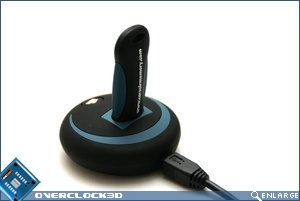
The Device itself has a fairly simple, but stylish design. Just two main colours (excluding the Corsair Logo) are used, and the effect is very striking and professional. It has a rubbery texture, with the base of the Port being a fairly thick rubber, giving it plenty of grip on most surfaces. At the back is the small mini-usb port for PC connectivity, whilst at the front the Corsair logo also acts as the Backup button. The USB port on the top is angled towards the back slightly, and is located in the rear half of the device.
Corsair were kind enough to send us a 32gb Flash Voyager drive for the pictorial and testing, which really does look the part when used with the Port. The matching colour schemes, as well as the drive fitting perfectly in the dock, means they compliment each other fantastically. If I were to be picky, my only complaint with the aesthetics would be that the Mini USB plug does protrude from the back of the device quite a lot, damaging the smooth look a little; it would have been nice to have this integrated into the device a little more.
Overall, I think the Voyager Port is a good looking device, and should certainly look nice perched at the edge of a desk. Something not mentioned in the specification is the weight of the Port, which is actually fairly low. It would have been nice to have it slightly heavier, to provide a little more stability when inserting/removing a flash drive.
Most Recent Comments
Very nice product and very nice review..
Thing is I'd need a pretty hefty memory stick to be able to back up enough data.
Nice review, link to the 32GB drive is broken 
As bungral said, its not big enough, unless you used it for major backups only...

As bungral said, its not big enough, unless you used it for major backups only...
Quote:
|
Originally Posted by name='PeterStoba'
Nice review, link to the 32GB drive is broken
![]() As bungral said, its not big enough, unless you used it for major backups only... |
If It doesnt come back in stock in the next few days then Ill add a different link..
32/64gb may not seem enough, but actually, all my vital data was only a fraction of what I thought it would be.
Just buy a WD passport 160gb for £45 and use that, doesnt have to be the usb stick.
Quote:
|
Originally Posted by name='tinytomlogan'
Just buy a WD passport 160gb for £45 and use that, doesnt have to be the usb stick.
|
Relatives have one and it is awesomez
Quote:
|
Originally Posted by name='tinytomlogan'
Just buy a WD passport 160gb for £45 and use that, doesnt have to be the usb stick.
|
Yep, WD Passports go up through 500GB and are USB powered:
http://www.wdc.com/en/products/Products.asp?DriveID=525
we have one of the passports at work and it is excellent
i'm thinking of getting one for myself now
Looks amazing 
I already own a Corsair Voyager but I think ill b sticking to my WD passport for the time being

I already own a Corsair Voyager but I think ill b sticking to my WD passport for the time being

One thing I hate about the Passport is that it is so f00king expensive. Well for me anyways. 

Looks and sounds great. One question though is does the port/software allow for backup of the USB stick to your PC? as I would find that more useful backing up my PC to the USB Stick.
Quote:
|
Originally Posted by name='Tomcat31'
Looks and sounds great. One question though is does the port/software allow for backup of the USB stick to your PC? as I would find that more useful backing up my PC to the USB Stick.
|

Sorry for not making my self clear. I currently keep alot of my documents and files on my USB stick as I work between 4 pc's at different locations. As such every so often I take a copy of my usb stick as save it to my PC. Can this device do this for at a press of a button?
Quote:
|
Originally Posted by name='Tomcat31'
Sorry for not making my self clear. I currently keep alot of my documents and files on my USB stick as I work between 4 pc's at different locations. As such every so often I take a copy of my usb stick as save it to my PC. Can this device do this for at a press of a button?
|
Thanks for that, it sounds like this device will be no good for what i need to do, as i want a quicker way to take a backup of my usb stick rather than use the stick as a backup drive.


http://www.overclock3d.net/gfx/artic...104548403s.jpg
Find out how the Corsair Flash Voyager Port got along here.