Roccat KONE [+] Review
A Closer Look
Published: 29th November 2010 | Source: Roccat | Price: £67.99 |
A Closer Look
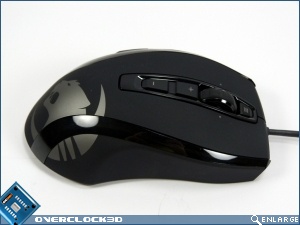
The original Kone had a light-up logo at the palm part of the mouse. This has now been changed to a large printed logo. Amazingly enough although you'd imagine this is a lessening of features it actually looks better in our opinion when the mouse is both lit and idle.
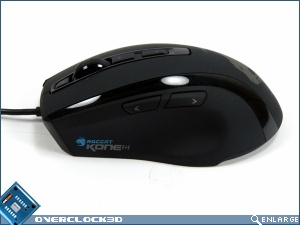
It's designed for right-handed users but isn't so insanely ergonomic as, for example, the Logitech MX Revolution that it's problematic for left-handed people. Obviously the button positioning is fixed but it's possible to use left-handed. The Kone [+] is coated with a very tactile rubberised coating that really makes the mouse feel soft and grippy without being squidgy or sticky. On the left hand side are the standard back and forward buttons you find on all mice, except the rear button is mapped by default to the EasyShift[+] function.
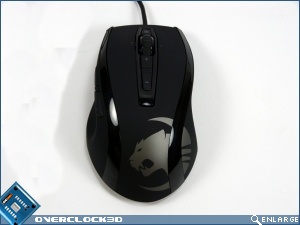
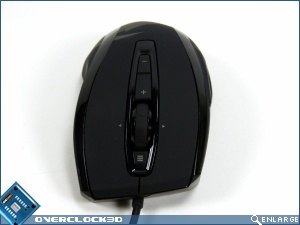
Up front is where the real action is. The plus and minus buttons are there for on-the-fly DPI changing which can also have an audio cue should you so desire it. The scroll wheel is the type with specific notches as you scroll around rather than the fully smooth motion which should help weapon selection. It also scrolls in all four directions so you can move across documents as well as up and down them. In front fo that is another button that's assignable as we'll see on the next page.
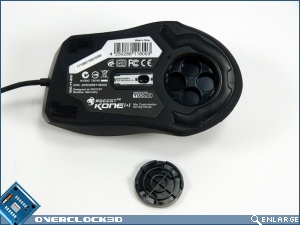
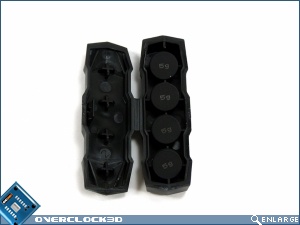
Underneath we have the 6000DPI laser as well as the place for any addition weight should you want to tune the Kone [+] to be heavier. The original Kone came with four differing weights whereas the Kone [+] comes with 4 5g weights instead. This is a far preferable system as it gives an extra level of tweaking should you wish all your weight to be in a certain direction.
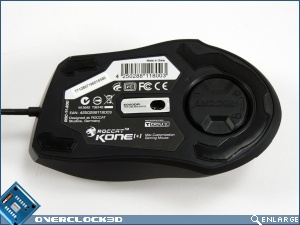
Speaking of the weights they come in a container that matches the rest of the design perfectly, although isn't the easiest thing to open in the world.
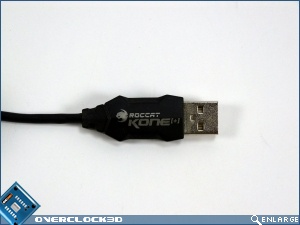
In keeping with the insane attention to detail even the USB plug is branded perfectly. A boon for any of us who've been round the back of our cases wondering which of the 6 identical black plugs is what.
Most Recent Comments
Looks nice too, could deffo see me using it. Can't say it's cheap though
Thanks for the review. I've been waiting for a VB review for a while, always makes for pleasurable reading
The only issue is that it doesn't support my pinky (no biggie
The driver and customisation is awesome.
There is a very small aperture on the bottom leading to two sensors. If you get any dust/fluff/eyelashes in here (and it does seem to suck them in) then the responsiveness goes to hell and the mouse becomes very jumpy at any resolution.
There is no easy way I can see to dismantle the mouse and give it a good clean. So I'm forever blowing into the bottom of the damn thing.
No, it isn't drivers. As soon as I remove the obstacle the mouse works fine. Just wish it didn't suck muck in, and be extremely difficult to clean.
And compared to some rig/desk shots I've seen on here I have a pretty clean environment.
I have a really old logitech mouse on my other PC, which on inspection also seems to have an eyelash stuck in it, but becasue the aperture is so much wider the sensor is not impacted.
I might well ebay this and get something else. It's a pain.
HTH
Actually this is my 2nd mouse. I had to return my first due to scroll wheel issues, which roccat said it sounded like a defective sensor.
So far this 2nd one's wheel issues haven't surfaced.
Another issue I had was when I turned on my PC the other day, the mouse erased itself. All my custom profiles, dpi settings, everything gone. It was by chance I made a backup of the profiles the night before and restored it. But still, worrying.
Another problem is that the easyshift, can no be bound to certain keys.
I know its just me being picky, but I wanted it to be the scroll wheel right movement. Only main buttons can be easyshift. Not sure why, what difference does it make?
I love the mouse, don't get me wrong and I upgraded from a razer imperator to this.
I'm so tired and bored of paying out loads of money for razer products which aren't that great. I'm typing this on a razer blackwidow ultimate keyboard, and it keeps doing double S or L. I've spent about 15 minutes typing this, removing the double letters. Oh, and punched it twice.


Continue Reading