
Roccat Kone 3200dpi Gaming Mouse
Final Verdict
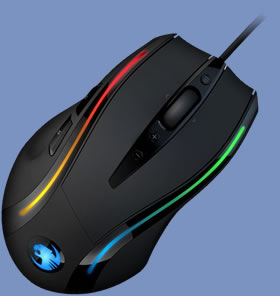
Published: 14th June 2009 | Source: Roccat | Price: £42.99 |
Final Verdict
Well what can I say? The Roccat Kone has been ticking the positive boxes left, right and centre. The hard work that's gone into the development and production of this high performance mouse has clearly paid off by offering a product that clearly holds it's own against competitor brands, who have had the advantage of many more years of experience. A gaming mouse must be very responsive, comfortable and very durable. Roccat's Kone offers exactly that along with stunning aesthetics and finally reliable and efficient software. However, returning to the manufacturer's main objective of offering products that clearly stand out from the competition, where exactly does the Kone do so? It fared well in all of our tests and it is without a shadow of doubt a potent alternative to similarly priced Logitech and Razer gaming mice, but I do not believe that it particularly “stands out” as such.That being said, I would say that the shining robot animal in question offers enough to perhaps persuade the customer to buy one over it's competition. As a first attempt to penetrate a relatively competitive market segment, I believe that Roccat have done a fantastic job. At £42.99, the company's strategy of a midrange gaming mouse was very sensible and when combined with the fact that the product is very well refined and offers more from an aesthetic point of view than it's competition, I must say that the Kone mouse is just superb. With a bit of strong promotion and marketing strategies, I strongly feel that Roccat are on the road to success.
The Good
- Great Performance.
- Useful Tracking Calibration Utility.
- Versatile and Memory Friendly Drivers & Software.
- Stunning 38 LED Colour Design.
- Generally good build quality.
The Mediocre
- Pricing could have been more competitive.
The Bad
- None.

Well done Roccat and many thanks for the opportunity to review your product! Discuss in our forums.
Most Recent Comments
Looks pretty cool, would like to try it out. I love my logitech 518 but ? This could feel and work better than mine I would switch. Nice pic.
Nice mouse, might have to consider this to go with my Roccat Taito mat 

It really is a great mouse. In addition to what the article said, i can add that the buttons and in particular the scrolling wheel have a really nice and precise feel to them.
However, the article left me wondering: did you not test the mouse on a mouse mat matching the price class of the mouse? I mean, sure, it's fun to read about it's performance on clay, but it might be a little more relevant to reveal how it performs on, say, a Razer Destructor.
I just so happen to own a Razer Destructor
, and i can report that, coupled with the Roccat Kone, the mouse slides with almost no resistance and is extremely precise.
However, the article left me wondering: did you not test the mouse on a mouse mat matching the price class of the mouse? I mean, sure, it's fun to read about it's performance on clay, but it might be a little more relevant to reveal how it performs on, say, a Razer Destructor.
I just so happen to own a Razer Destructor
, and i can report that, coupled with the Roccat Kone, the mouse slides with almost no resistance and is extremely precise.Thats what we won't to here how it rely performs. The action of the contrrols, thanks for the update.
Who ever plays with over 800dpi is crazy. With 800dpi I have to set game sensitivity to 0.3-0.7. anything over that is ridiculous and not worth the changing tbh. Unless you like 12cm per 1010101010 degrees turn get this mouse
.
Nice review though I gotta say that but the DPI is overrated and pointless. Doesn't even enhance gameplay because nearly everybody lowers the DPI to 800 anyway. Unless you were working with a 2000" screen I see no point for the DPI.
.Nice review though I gotta say that but the DPI is overrated and pointless. Doesn't even enhance gameplay because nearly everybody lowers the DPI to 800 anyway. Unless you were working with a 2000" screen I see no point for the DPI.
Quote:
|
Originally Posted by name='Youngie1337'
Who ever plays with over 800dpi is crazy. With 800dpi I have to set game sensitivity to 0.3-0.7. anything over that is ridiculous and not worth the changing tbh. Unless you like 12cm per 1010101010 degrees turn get this mouse
.Nice review though I gotta say that but the DPI is overrated and pointless. Doesn't even enhance gameplay because nearly everybody lowers the DPI to 800 anyway. Unless you were working with a 2000" screen I see no point for the DPI. |
I disagree. I play any fps with the mx518 at 1800 DPI and still I have to set my mouse sensitivity to 12.0 in the source games.
Having a quite sensitive hand I just don't like dragging it around for hours. I prefer small subtle movements, and that's where DPI comes in.
Quote:
|
Originally Posted by name='monkey7'
I disagree. I play any fps with the mx518 at 1800 DPI and still I have to set my mouse sensitivity to 12.0 in the source games.
Having a quite sensitive hand I just don't like dragging it around for hours. I prefer small subtle movements, and that's where DPI comes in. |
.Quote:
|
Originally Posted by name='Youngie1337'
Wow! When I have 12 sensitivity with 800DPI even 2cm it's around 720 degrees
. |
Is it me or is it that if you look at it at a certain angle, it is more suited for left handed players?
Price needs to go down. :P
Quote:
|
Originally Posted by name='Luigi'
it varies depending on how sensitive you have your mouse set in windows...
|
I had this mouse.
At this mouse different sensitivity for high speed of moving and low.
For example, if to move very slowly that having made in game, the turn of 360 degrees, the mouse on a rug will move on 10 see
If to move very quickly, on 360 degrees the mouse on a pad will move on 20 see
In other words the mouse has negative acceleration!
Moreover the mouse way on a pad with slow speed does not depend on sensitivity of the mouse established in the driver!
Sensitivity in the driver depends on parametre only average and high speed of moving.
In other words if we move the cursor from a screen left edge to right with a great speed, and then we will slowly return to a left edge that the mouse will not return to an start point on to mousepad
At this mouse different sensitivity for high speed of moving and low.
For example, if to move very slowly that having made in game, the turn of 360 degrees, the mouse on a rug will move on 10 see
If to move very quickly, on 360 degrees the mouse on a pad will move on 20 see
In other words the mouse has negative acceleration!
Moreover the mouse way on a pad with slow speed does not depend on sensitivity of the mouse established in the driver!
Sensitivity in the driver depends on parametre only average and high speed of moving.
In other words if we move the cursor from a screen left edge to right with a great speed, and then we will slowly return to a left edge that the mouse will not return to an start point on to mousepad
Quote:
|
Originally Posted by name='bckbacek'
I had this mouse.
At this mouse different sensitivity for high speed of moving and low. For example, if to move very slowly that having made in game, the turn of 360 degrees, the mouse on a rug will move on 10 see If to move very quickly, on 360 degrees the mouse on a pad will move on 20 see In other words the mouse has negative acceleration! Moreover the mouse way on a pad with slow speed does not depend on sensitivity of the mouse established in the driver! Sensitivity in the driver depends on parametre only average and high speed of moving. In other words if we move the cursor from a screen left edge to right with a great speed, and then we will slowly return to a left edge that the mouse will not return to an start point on to mousepad |
. I tried and tried nothing works AT ALL. I tried my own apps and still can't get it to work. I did see someone make something called DirectInput which gets rid of the negative acceleration when you load the .exe with the app. Unfortunately it was banned as a hack
, nothing to do with hacks but yeah
.I get what you mean though, if you moved mouse from A to B and did the same exact movement from B to A it would be a different location the mouse lands on.
Now I use mouse Microsoft Sidewinder X8.
At this mouse (X8) absolutely is absent what or acceleration, both negative and positive.
It is possible to move X8 with any speed it comes back precisely there whence started.
I check in Unreal Tournament 3, and also on desktop windows.
It worked equally in WinXP and now in Win7 64
To me it is very important that there was no acceleration as I play UT3 actively using Combo Shock.
Mine player name iG0Lka=-
_http_://dfbgaming.com/ut3_stats/index.php?page=highs&showlist=Rewards%3AMost+Combo+Kings&player_sel=all&game_name=ut3pc
At this mouse (X8) absolutely is absent what or acceleration, both negative and positive.
It is possible to move X8 with any speed it comes back precisely there whence started.
I check in Unreal Tournament 3, and also on desktop windows.
It worked equally in WinXP and now in Win7 64
To me it is very important that there was no acceleration as I play UT3 actively using Combo Shock.
Mine player name iG0Lka=-
_http_://dfbgaming.com/ut3_stats/index.php?page=highs&showlist=Rewards%3AMost+Combo+Kings&player_sel=all&game_name=ut3pc
Quote:
|
Originally Posted by name='bckbacek'
Now I use mouse Microsoft Sidewinder X8.
At this mouse (X8) absolutely is absent what or acceleration, both negative and positive. It is possible to move X8 with any speed it comes back precisely there whence started. I check in Unreal Tournament 3, and also on desktop windows. It worked equally in WinXP and now in Win7 64 To me it is very important that there was no acceleration as I play UT3 actively using Combo Shock. Mine player name iG0Lka=- _http_://dfbgaming.com/ut3_stats/index.php?page=highs&showlist=Rewards%3AMost+Combo+Kings&player_sel=all&game_name=ut3pc |
I use Logitech MX518 and Razer Diamondback 3G. I'm looking at a graphic tablet atm to try play with that, would be interesting.
DPI is important when photo editing comes into account but gaming I can't really see difference.
Nice review by Mul, glad he got the position 
Where did he dissapear to though once he'd got it

Where did he dissapear to though once he'd got it

Nice review m8. Deffo gonna get one of these.
Quote:
|
Originally Posted by name='PeterStoba'
Nice review by Mul, glad he got the position
![]() Where did he dissapear to though once he'd got it ![]() |

After looking at what you said Youngie, I took a look at my Logitech G5 settings and that lets me turn off my acceleration which for fps's will be quite helpful as I should be able to control stopping much better as it'll only move how much I tell it to and not speed up.
Handy.
Hadn't given it much thought before.
Handy.
Hadn't given it much thought before.
Roccat needs to get on the ball and get a couple of these (and all their other products) across the pond to the North American retail market. Maybe as economies improve...
Yea I would like to check these out.
There's no doubt that the Roccat Kone is a high-tech precision gaming mouse with many great features.
It has a 3200 DPI Pro-Aim Gaming Sensor to reduce Pick-Up-Flight; a TCU (Tracking Control Unit) to calibrate the laser power to match the mouse pad surface; an Integrated Turbocore to save CPU power; 128kB of Internal Memory to save up to five Game Profiles; a customisable light system with 5 LEDs capable of displaying the full spectrum of colors; and a FastClip Weight Kit to change the weight of the mouse from 118g by 5g, 10g, 15g and 20g.
But the so-called Ergonomic Hybrid Shape that is supposedly suitable for people with both claw grip or palm grip fails to impress me. If you have large hands then you should find this mouse very comfortable and easy to dominate.
However, if you're like me and have small-medium sized hands then don't be surprised if you get wrist ache and have trouble moving it quickly from side to side. My wrist ache got so bad after the first 5 days I put the Kone back in it's box and got my old faithful Razer Diamondback mouse back into action. The Razer is such a fantastic mouse; it's fast, accurate, and lightweight so you really feel in control of the mouse rather than the mouse controlling you.
In summary, if you've got big hands (Roccat is a German company) then buy the Roccat Kone, otherwise get something smaller like a Razer Diamondback.
It has a 3200 DPI Pro-Aim Gaming Sensor to reduce Pick-Up-Flight; a TCU (Tracking Control Unit) to calibrate the laser power to match the mouse pad surface; an Integrated Turbocore to save CPU power; 128kB of Internal Memory to save up to five Game Profiles; a customisable light system with 5 LEDs capable of displaying the full spectrum of colors; and a FastClip Weight Kit to change the weight of the mouse from 118g by 5g, 10g, 15g and 20g.
But the so-called Ergonomic Hybrid Shape that is supposedly suitable for people with both claw grip or palm grip fails to impress me. If you have large hands then you should find this mouse very comfortable and easy to dominate.
However, if you're like me and have small-medium sized hands then don't be surprised if you get wrist ache and have trouble moving it quickly from side to side. My wrist ache got so bad after the first 5 days I put the Kone back in it's box and got my old faithful Razer Diamondback mouse back into action. The Razer is such a fantastic mouse; it's fast, accurate, and lightweight so you really feel in control of the mouse rather than the mouse controlling you.
In summary, if you've got big hands (Roccat is a German company) then buy the Roccat Kone, otherwise get something smaller like a Razer Diamondback.

http://www.overclock3d.net/gfx/artic...221409854s.jpg
Roccat Kone 3200dpi Gaming Mouse
