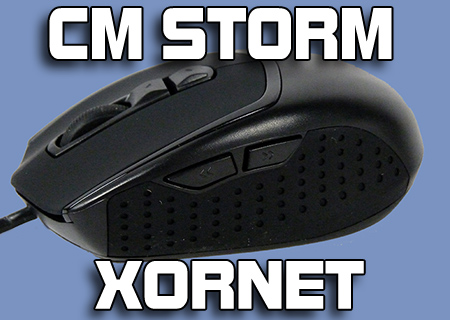
CM Storm Xornet Review
Introduction and Technical Specifications
Published: 14th December 2011 | Source: CM Storm | Price: £20 |

Introduction
We've often commented here at OC3D at how mice are most definitely split into two camps. There are your generic 2 or 3 button jobs that come with a prebuilt PC from your local emporium and cost about £2, and gaming mice which tend to be stacked to the gills with bells and whistles and cost anything up to £100+.
What the market is crying out for is a no frills gaming mouse. Great sensor, a few buttons, affordable price.
CM Storm had a stab at this with the CM Storm Spawn, which came with a 3200DPI sensor and otherwise very little else. Unfortunately it was priced just on the fringes of the middle-range gaming mice that have lighting and macros, so having gone back to the drawing board and designed something capable of being priced even cheaper, they have produced the Xornet.
Available just under £20 this is extremely affordable, so does it provide enough thrills to be a worthy purchase?
Technical Specifications
As you can see from the specs, this is a compact number with everything pared to the bone. The primary point of interest is the 2000DPI sensor, which is obviously a long way below the high-end sensors we've seen on a lot of gaming mice, but equally it's just sensitive enough to be perfect for your average gamer.
| Model Number | SGM-2001-BLON1 |
| Available Color | Black |
| Material | Rubber Grip / ABS Plastic |
| Dimensions | (L) 107 X (W) 75 X (H) 35 mm / (L) 4.2 X (W) 4 X (H) 1.3 inch |
| Net Weight | 142 g / 0.313 lb |
| Sensor | 2000 DPI Storm Tactical Optical Sensor |
| Maximum Tracking Speed | 160 IPS |
| Maximum Acceleration | 23 g |
| Polling Time | 1.0 ms |
| Speed Measurement | 6700 FPS |
| Onboard Memory | 8 Kb |
| Form Factor | Right Hand Ergonomic |
| Button Assignment | 5 mouse buttons+ 2 fix function buttons |
| Weight System | No |
Let's get up close and personal with the Xornet then.
Most Recent Comments
it looks a bit fat, and i cannot tell from the pics of the actual size.
i had to get my ruler out, and measure my deathadder for a comparison.... and yes - it's fat
I just bought this mouse yesterday and it arrived earlier tonight at teatime. Upon seeing the mouse I thought it looked tiny compared to the 4.8 inch Gigabyte M6900 it is replacing, in fact I didnt beleave it was its advertised 4.2 inches and had to measure it
I have been playing BF3 with it for a couple of hours and it does seem a good mouse but the 2000 DPI feels a bit too slow to me and the 2 lower DPI speeds are really slow to the point of been unusable for me ( even too slow for sniping)
As I mensioned the mouse is tiny (in length) and as I have big hands it isnt really right for me but if you tend to hold your mouse with your finger tips rather than lay your hand down flat on the mouse then you should get on fine with it, that said though I didnt have any real problems playing and aiming with the mouse and pretty much got on fine with it
Oh and yes its fat
The generic one I use now just isn't up to the task of working in audio software.
Which reminds me
The DPI settings are more than enough and I only use the 1000DPI setting, sometimes going down to the lowest one for sniping. I am a low sens gamer and the DPI settings are perfect. It is so small and light that I sometimes don't even feel I am using it.
The most important thing to me is lift off distance and with the latest firmware version 55 this mouse has the lowest LOD I have ever used, even better than my previous Logitech G1, which was also a great mouse.
To sum up, if you are a claw/fingertip gamer looking for a light mouse with some DPI settings, a few extra side buttons and low Lift off distance then you cannot beat this mouse, I got it for 17 quid for crying out loud! It is a great move by CM to target this part of the market, good job!
Any recommendations?


Today we take a look at the latest CM Storm gaming mouse, the Xornet. At an affordable price, is it good value?
Continue Reading