


XFX 9800GX2 Quad SLI

Quad SLI – How it works
Briefly, SLI (Scalable Link Interface) works by combining 2 graphics cards together to render images quicker or indeed with higher settings such as AA/AF. It does this by using one of two methods:
Split Frame Rendering – A process by which each card ‘draws’ a half of each frame so that every frame you see on the screen is actually processed by both GPU’s.
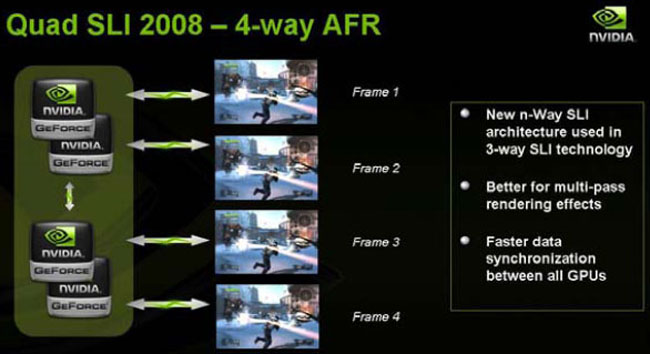
Alternate Frame Rendering – Does exactly what it says on the tin. Each GPU processes a single frame allowing the frames to then be rendered ahead of time preventing any bottleneck of processes waiting to be rendered. This process is called interleaving. One GPU will process one frame while another GPU will process the next, taking it in turns to render the frames.
Quad SLI however first encountered problems with the old 7950GX2 because DirectX 9 was incompatible with 4-way AFR so a mixture of both SFR and AFR was used. SFR is much less efficient than AFR in the latest games due to the amount of complex textures, lighting, ray tracing which is now incorporated in todays modern games era. Due to this and DX9 incompatabilities, the 7950GX2 simply didn’t work too well. With DirectX10 now upon us, 4-Way AFR is now not only feasable but with the optimised drivers from Nvidia becomes a very viable solution to those wanting to game at high resolutions with all the trimmings.
Requirements
As we will be testing a top of the range setup it should come as no surprise that you will need the best equipment if you are going to take maximum advantage out of the QUAD SLI experience. Here is what I would recommend:
- Monitor. I really wouldn’t bother with Quad SLI if you intend on running at resolutions below 1280×1200. The reason being is that at that resolution the benifits will be so small that the advantage of running a Quad SLI system is lost. SLI in the past has recieved mixed reports with some swearing by it and others giving scathing reports. I believe a lot depends on what resolution SLI was run at.
- Motherboard. You will need an NVidia based SLI capable motherboard along with 2x 16 speed PCIe slots. Although Quad SLI is reported to work on older Nforce 4 chipsets I would recommend either NForce 680,780,790 boards as the old NForce4 mainboards will cripple your choice of CPU which in turn will hinder the performance of Quad SLI.
- Memory. The more the better. The faster the better. Simply put this is one area where you will see a benefit of getting higher capacity modules.
- PSU. Anything less than a household nuclear reactor won’t be sufficient. You remember Chernoybl – they tried running Quad SLI on a cheap PSU and look what happened. Ok, so I have exaggerated – As each GPU pulls apx 198W of power, a good mainboard, overclocked quad core, high speed ram and your other peripherals can easily take the power consumption of a Quad SLI rig into the 800w mark. I would therefore recommend a PSU that weighs in at least that wattage – and make damn sure its a quality one with powerfull rails otherwise you can kiss goodbye to it (and possibly your Quad SLI setup) pretty soon. You will also need to ensure that the PSU has both 2×8 pin and 2x6pin PCIe connectors.
- Case/Cooling. Something that is often forgotten when considerring those nice lush new graphics cards. First of let me tell you that if you can fit an 8800GTX in your case the the GX2 will also fit. As for cooling then I’m sure you have seen the video making the rounds about some nutter frying an egg on one of these cards so it goes without saying the GX2 is a hot sucker. Add another card and you have the means to not just fry an egg but start your own roadside cafe. Make certain your case has good ventillation with a nice influx of cool air otherwise things will overheat pretty rapidly.
- Money. Yup these cards are expensive. Buy two of them and you won’t be getting a Christmas card from your bank manager, your wife may file for divorce and you’ll be living in poverty for a while but hey who cares – you will have the fastest gaming rig money can buy…right?
