


Hiper Osiris ATX Case

Performance
Test Specification
- Intel Q6600 G0 @ 3.6ghz
- Gigabyte 965p DS3
- ATI 3870×2
- Seagate barracuda 500gb 7200.11 32mb cache
- Silverstone Strider 1000w
- Xigmatek HDT S-1283 CPU HSF
To see how effective the Osiris is at keeping you components cool I ran a series of benchmarks including 3dMark06 (looped 3 times), Prime 95 version 25.6 (2 hours) and HD Tach to heat up the case as much as possible and then recorded the results via Everest Ultimate ver 4. To ensure equality I only tested the case in in it’s current condition with minimal cable tidying using the provided cable ties. The three provided 120mm fans were used via molex connectors (full 12v power) and the CPU HSF was set to 100% (auto disabled) via bios. Here are my findings :
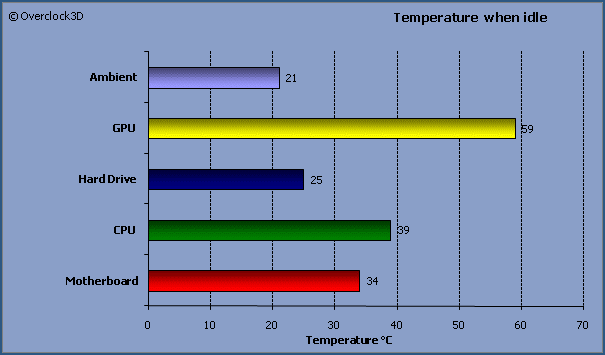
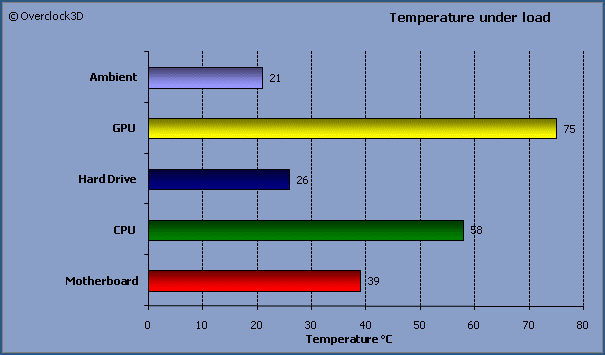
Not a bad result at all. I was impressed with the GPU result as in my previous case the temp was hitting 80c after a single 3dmark run. No surprise that the hard disk temp didn’t really move much, testament to the attached fan on the intake and the exhaust fans were doing well, ridding the case of heat from the CPU HSF.
During the above Load testing I took some temperature readings with a thermal probe to see where the hotspots were. While I understand that this isn’t the most scientific approach as temps can vary depending on ambient temps and hardware used it will at least give an indication of how good/bad the airflow in the case is. I found the area around the NB to be hot (29c) which due to the CPU HSF blowing back to front and not downward is to be expected. The PSU area was surprisingly cool but the inferno was the area around the 3870×2 memory heat sinks (44c). This however is cooler than my current case which is testament to the Osiris’s airflow/cooling capabilities. It is worth bearing in mind that only one hard disk was installed in the hard drive rack so optimal airflow is passing through the case during this investigation. With four hard drives installed and therefore a lot more restriction, you would expect these temps to increase slightly.
