Cooler Master Centurion 590
Testing
Published: 15th August 2008 | Source: CoolerMaster | Price: £60 |
Testing Method & Hardware
Testing a case is not as simple as the likes of a graphics card in that there's no real benchmarks that can show performance in a quantative form. In light of this I will try to convey how easy the case is to work with and then test its thermal performance with the components installed. Today's test setup consisted of:
Intel Core 2 Duo E7200 ( 3.6Ghz, stock cooler)
Asus P5Q-E
1GB Crucial Balistix
8800GTS
Cooler Master Real Power M850
Installation
Installing hardware into the Centurion 590 was a fairly painless affair. The roomy insides meant that there was plenty of space to get your hands around components, and to get to the fiddly bits such as the twist and push system on Intel's reference cooler. The biggest challenge came from putting such a large PSU into the chassis. The larger PSU significantly obscured the cable hole in the motherboard tray where the front panel connectors poke through.
As you can see the Centurion 590 allows for a reasonable effort to be made when routing cables. With more time you could hide away the majority of the wires that litter the bottom next to the psu. Looking at the motherboard area, Cooler Master have clearly put a lot of thought into allowing the user to keep the main area clutter-free and it's paid off. Only the worst laid out motherboards could thwart their efforts.
Unfortunately my hopes of fitting a 240mm rad were hindered. It could be done, but would require some creative thinking from the individual. The two fan mounts on the top wouldn't house an 120.2 radiator straight off, but by using some large headed screws a low profile radiator could be fitted using the holes in the mesh, rather than the default fan holes.
Temperature Tests and results
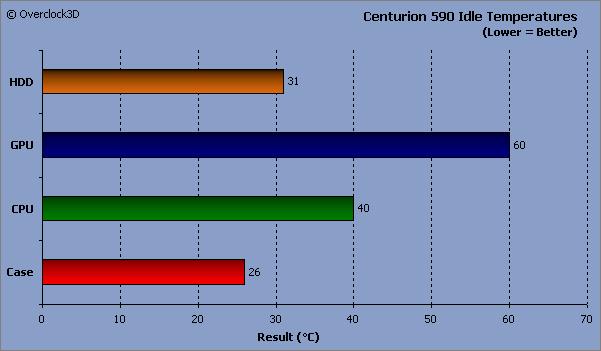
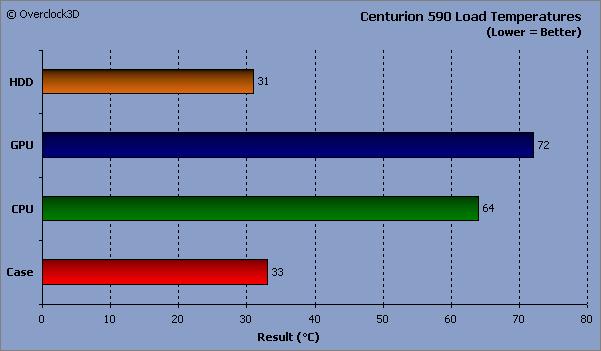
To put the Centurion 590 though its paces the system was left ide for 30 minutes and the temperature recorded. After that it was loaded up with ORTHOS for the CPU, ATItool for the GPU and HDtach's long benchmark for the drive. In order to ensure a fair test, only the fans that came with the chassis were used.


As you can see the Centurion 590 did a reasonable job at keeping the hardware inside cool, and only allowing a 7°C rise between idle and load. Obviously though this could be reduced by adding fans to the mass of extra mounts that the case provides. Overall the case faired well, by not allowing anything to overheat and providing plenty of flexibity.
Lastly we look at the conclusion...
Most Recent Comments
Don't really like that case.
But I found that the fan on the rear of the motherboard chassis to be useful. Good enough to draw cold air to the CPU
Nice very review Ham, pitty about the rad.
Been looking for a budget case to internal house my 240 rad. Looks like it will be the NZXT Tempest :S
Woah, when did this go live. Who likes my shrubs then? 
Is there a hole in your motherboard or something then? cos there's pretty much no way of the air getting to the cpu from that fan. In this case at least.

Quote:
|
Originally Posted by name='Hassan'
But I found that the fan on the rear of the motherboard chassis to be useful. Good enough to draw cold air to the CPU
|
I've had a couple Cooler Master cases, they look good, feel sturdy (as compared to my NZXT Zero), and are inexpensive. I've been looking at cases, and the 590 presents a problem for me... the HDD/optical drive bays run from the top to the bottom. Another case, the COOLER MASTER Elite 340 RC-340C-KKN1-GP Black Steel MicroATX Mid Tower Computer Case, has two optical drive bays and two HDD bays, with the rest of the space below wide open. This will allow easy installation of a 120mm radiator I can mount two fans on (push/pull) for an internal water cooling rig. One bay for the optical drive, the other bay to house a Koolance pump/reservoir combo, and get a Danger Den CPU water block... should work just fine. Radiator would be a Danger Den GTX, like double wide so the water takes longer to run through and get cooler before going to the CPU block.
Thats one of the things I like about Cooler Master also... they make a lot of cases, so eventually you should find one you like, that will suit your needs.
Quote:
|
Originally Posted by name='Ham'
Woah, when did this go live. Who likes my shrubs then?
|

Hi , I think this CM590 is a very good case with a few minor defects , but overall is good
I have built two rights with the centurion 590 so far, and I haven't had any major problems. Installation of the back upper fan is a pain in the ***, and the 'toolless' design leaves you using screws for about 75% of the job instead of 100, but no major problems.
In the now about 5 hours I have spent assembling hardware in it I have never met any serious trouble or cut my hands. I think that overall for €70 this is quite a good case.


http://www.overclock3d.net/gfx/artic...153313228s.jpg
Cooler Master Centurion 590 review