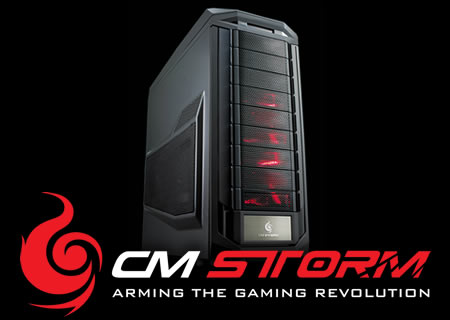
CM Storm Trooper Review

Published: 23rd November 2011 | Source: CM Storm | Price: £139.99 |

Introduction
We pretty much all know that CM Storm is the gaming arm of Cooler Master but lets take a look at what they say about them selves:
Owning the PC trenches for almost two decades, Cooler Master ’s veterans present their scars from battles past as claims of triumph over the competition. United with a new generation of eSports athletes and engineers, now marching under the flag of CM Storm, the time has come to reveal truly ground-breaking, military grade hardware for the gaming revolution.
Through long-standing research programs, CM Storm is co-developed with the world’s most prolific enthusiasts and eSports prodigies. Thanks to intensive testing and continuous feedback, the CM Storm division has been able to encompass and improve upon gamers’ needs and their tough to handle scenarios.
By working directly with the gaming community we have injected our Storm Tactics into each and every product we make. Storm Tactics, with a heavily dedicated focus on Strength, Security and Control, will keep your most vital gear fortified and well tuned at all times.
2008 marks a new era for Cooler Master, as its fierce Storm Gear stands ready at bay to mobilize and back up your gaming skills.
So without further adue lets take a look at the much anticipated latest case to come from the CM Storm stables the Trooper.
Specifications
| Model Number | SGC-5000-KKN1 | ||||||||||||
| Available Color | All Black | ||||||||||||
| Material | Steel body, Front Mesh / Plastic bezel | ||||||||||||
| Dimensions | (W) 250 x (H) 605.6 x (D) 578.5 mm (W) 9.8 x (H) 23.8 x (D) 22.8 inch | ||||||||||||
| Net Weight | 13.7 KG / 30.2 lbs | ||||||||||||
| M/B Type | Micro-ATX, ATX, XL-ATX | ||||||||||||
| 5.25" Drive Bay | 9 | ||||||||||||
| 3.5” Drive Bay | 8 (converted from 5.25” bay by two 4-in 3 HDD modules) | ||||||||||||
| 2.5” Drive Bay | 13 (converted from 5.25” bay by two 4-in 3 HDD modules) | ||||||||||||
| Cooling System |
| ||||||||||||
| Expansion Slots | 9+1 | ||||||||||||
| I/O Panel | USB 3.0 x 2 (internal), USB 2.0 x 2, e-SATA x 1, Audio In and Out ( Supports HD audio) | ||||||||||||
| Power Supply Type | Standard ATX PS2 / EPS 12V | ||||||||||||
| Maximum Compatibility | CPU cooler height: 186 mm / 7.3 in GPU card length: 322 mm / 12.7 in |
Video Review
Conclusion
Its epic, End.
If only it was that easy! Lets try and start from the top then, the handle on the roof of the case is not only very sturdy and secure but it also has a nice rubbery feel top with soft rubber fins somewhat similar to a mountain bike handle bar grip underneath so that its much more comfortable when carrying your rig around. The I/O panel is a work of art to be honest with you, the first thing that catches your eye is the large power button that lights up red with the CM Storm logo. Below that there is the fan controller which bleeps as you press the buttons to increase or decrease the speed but this is also backed up with lights to indicate what speed you have the fans set to out of a possible 6 options. Other things to point out are 2 USB3 ports, 2 USB2 and a tidy button to disable the LEDS in the two from fans that come with the case which will please those of you out there that sleep with your PC on..... Prefer pyjama's myself.
The front of the case has a total of 9 optical bays, 6 of which are consumed by the 4 in 3 hard drive cages, these cages are also able to have the fans run across the front of the case or have them pulling air in from the very front of the case which is a very nice touch. Talking of hard drives there is a dedicated 2.5" hard drive mount for a total of 4 drives should you need it, if like us you don't like the look of it then its just 4 screws to remove it!
Yet more features showing you CM Storm mean business with this case is shown with the 9 total PCI slots at the back of the case meaning that even monster boards like the Gigabyte G1 Assassin, meaning multiple GPU configurations are easy peasey.
Another feature any LAN gamer or for that matter anyone that wants to hide something 'valuable' will love is the concealed drawer in the front of the case that is lockable so you can not remove it or have access to it from the inside either. Its practically a hidden safe deposit box! Perfect for putting your phone, wallet, MP3 player or any other valuable contraband and being able to lock it away out of sight.
Right heat sinks, it will gobble everything thanks to the 140mm rear exhaust fan giving the case some extra girth but this wouldn't be one of my reviews if I did not mention water cooling... Its got 2 grommets at the top of the back panel should you wish to use some kind of external solution. The top of the case has support for 2x 120mm and 2x 140mm fans, both of these will support radiators up to 60mm thickness if you install the fans on the outside of the case (underneath the top panel). Going on from this it also means you would be able to fit a Corsair H100 in a push pull config, radiator and one set of fans inside then the second set on the outside underneath the top panel. The top panel may take some time to remove as the handle is integrated but it can be done should you have the time and patience to do it.
Going on from the top of the case it is also possible to fit a 240mm radiator in the floor of the case towards the front, its not officially support but you could easily bolt in a 50mm thick 240mm radiator. If you got your tools out and cut a blow hole or trimmed the case a bit you could fit a 60mm rad with fans down there if you were prepared to move the hard drive cages up so it could breathe. Talking of the hard drive cages if you remove those all together you could fit a 360mm radiator in the front of the case if you got handy making some mounts. So in total that's 2x 240mm radiators AND a 360mm radiator all possible should you be willing to put a bit of effort in? Now you might understand why this case is epic!
Without a doubt this is the best CM Storm case to date, but in the right hands this could be the best case to EVER be released from Cooler Master as a whole. Big words for a case that delivers big. I love it, we love it, you will love it. All the other case manufacturers stand up and take note. This is how its done, and that's why we have bestowed the case with nothing short of the OC3D Gold award, if there was ever a case that has made me think gold was not quite worthy... Its this.
Awesome.
![]()
We would like to thank CM Storm for the Trooper we reviewed today, you can discuss the review in our Forums
Most Recent Comments
|
if you remove the hard drive bays you can put a 360 in the front |
Anyway CM Storm Trooper seems to be a very nice case at a very good price. If I hadn't fallen in love with the MK-1 I would have probably chosen the Storm Trooper (that is why I think it would have been interesting a review since their prices should be similar).
Great review as always. I'll be waiting for the next one!Quote
|
if you remove the hard drive bays you can put a 360 in the front |
if those features were combined with lian li's looks....phwor, winner alert.Quote
|
ugly case, but some brilliant, well-thought-out features .... if those features were combined with lian li's looks....phwor, winner alert. |
|
not gonna say you cant as I dont have one in front of me for better measuring but a 480 rad is abot 550mm tall and thats about 22.5 inches the trooper is 22.8 inches tall. Now not knowing where that 22.8 is internal or external (I think latter) I'd say it wont fit |
, most of them are 530mm, but anyway I'm not 100% sure as well.Watach this video, and info about 480 rad (4:32)My link , and on the bottom of the case you can install 60mm rad with push-pull if you remove the bottom HDD cage.Quote|
No 480 rads are not 550 long , most of them are 530mm, but anyway I'm not 100% sure as well.Watach this video, and info about 480 rad (4:32)My link , and on the bottom of the case you can install 60mm rad with push-pull if you remove the bottom HDD cage. |
As you can see you cant fit fans up top. You may have to get creative and move the handle support to the rear bracket if you wanna make it fit. These aren't extra wide fans or anything, they are the 120's from the front.Quote
as for the bottom mounted rad could you not replace the feet with wheels like the haf 932 has and mount the fans on the underside so you can use a thicker radQuote
|
Great review TTL, totally agree with the need for window panel with a case like that it should be mandatory. Just one quick question what was the general finish like by that I mean any sharp unfinished edges to scrap your skin off or slice paper cuts? |
S_I_N
Posted Yesterday, 04:26 AM
Montysaurus, on 30 November 2011 - 04:07 AM, said:
Great review TTL, totally agree with the need for window panel with a case like that it should be mandatory. Just one quick question what was the general finish like by that I mean any sharp unfinished edges to scrap your skin off or slice paper cuts?
its not computer building if ya dont bleed a little
I think over the last 14 years of self building I have bled enough thank you very much
the paint also has the same finish as the CM Storm scout so is top qualityQuote
In the bottom with the tray removed I measured roughly 8.5cm of clearance, you should be able to fit a medium thickness 240mm( less than 55mm thick) rad there no problems with 25mm fans. Although I would go something like a slim rad so the fans aren't choking for air.
The top has around 6cm of clearance. Bear in mind that you cannot mount fans uptop( without getting creative)so that room will have to accomodate the rad and the fans. And yes i've measured the mounting holes and there does seem to be mounts for 2x140 fans, although i havent actually fitted any.
Please note that all of these measurements were taken with a flexi-ruler so these are not entirely accurate, but from those measurements you should be able to envision what things you can put where.
CheersQuote
It's just that I'm saving money for a completely new build and was thinking what kind of stuff I can roughly get in there so I can plan how much money I'll have or will be able to spend. I really like the case though, so I'll probably stick with it. I'm thinking of ordering the case, the motherboard, cpu, gpu and a power supply first and then make sure myself how everything fits and what space is left, but still, just planning ahead so that I don't go crazy and just get stuff when I get the money, haha.
I'm thinking of going for a Intel i7 2700k CPU, a Corsair AX850 PSU, and an Asus Matrix GTX 580 GPU. Not sure about the motherboard yet. I'll probably choose Asus too, would love to get the new Rampage, but it's a deffinite overkill for me, although I really like the looks, the black chrome capacitors and everything. I'm thinking of the looks a lot. Will be a black/red theme with a few red and white leds maybe. It would be great if they released a new ROG motherboard for Intel processors with a price around 250 pounds.
I was thinking of watercooling the cpu and the gpu. Probably an EK Coolstream XTC 55mm 280mm rad at the top and the same but 47mm 240mm in the bottom. Probably a EK Nickel waterblock for the cpu and an Alphacool for the GPU. However I've heard a lot of stories about mixing copper with other metals in your system. I know Aluminium and Copper doesn't go together very good, but what about Nickel and Copper? Cause Alphacool GPU block is copper. I think I'll get an Alphacool backplate too. Will probably choose the Alphacool dual bay res transparent and stuff, cause it's cheap and simple and an EK 800L/hr pump.
Any suggestions on the parts? Both on system hardware and watercooling? As I said, it's a rough list of things and the parts may change as I'm new to watercooling. Although, as far as I understand EK and Alphacool are pretty good. I know the xspc rasa cpu block is technically good, but I don't like the looks. Are there any EK kits on the market in UK?
BTW, I'm thinking of making the coolant blood red by adding red and black dyes. But I've raid a lot of suggestions to stick with pure water without adding anything apart from biocide. What's your experience on this guys? Also, can you put in a kill coil and still ad biocide?Quote
As for your new build i would honestly wait for ivy bridge. Ive got a low end sandy build and i was contemplating buying a 2600k build after i sell my current cpu/mobo. But, in a few months ivy will be out and the leaked benchmarks look promising, so id best wait for that. And also the rampage is a 2011 socket mobo, the maximus extreme is the one you want.
Onto the gpu cooling, even though i think you can get waterblocks for the matrix,save yourself the trouble and buy a reference 580 or a hydro cu 2 from evga. The measly overclocks on the matris can probably be reached by a stock card anyway. The hydro cu"s come with the waterblock installed and there isnt a risk of breaking the warranty with installing one yourself.
About the kits, through my many days of working the shopping carts i hace found it much cheaper to buy the kit then buy the stuff you want to change eg new res or fittings. You could always sell the unwanted stuff or keep it as a backup. However the xspc ex kits are a fantastic value.
As i said before im not very experienced so i dont know about the mixing of metals or the coolant. There are many other more experienced people here so ask around.
I hoped this has helped somewhat and I apologise for all the typos as im typing on my phone.
CheersQuote
Hmm, but Ivy will be available from around April, which is still a long time. + we'll still have to wait for the manufacturers to create motherboards for it... And they'll probably cost a fortune. I also know that the 6th series Nvidia GTX card should come out very soon, but that will deffinately cost so much that it's not even worth thinking about it.
About the GPU. Emm, the thing is that I don't know whether I'll be able to get the watercooling parts straight away together with everything else and I really like Asus products. I know, I know, that the non reference MSI is better, but still. A lot depends on the price. Hopefully a new Asus ROG motherboard comes out by the time I get the money or atleas a month after and I can get a i7 2700k in it together with 16Gb Corsair Vengeance for ~70 pounds. Also, I hope the prices will drop a little bit. Want to get a 27" Asus screen together with the PC. It seems very well priced and quite good. Or maybe any other suggestions?
Big thanks for the advice
1. SGC-5000-KWN1 (Window Panel) [Link]
or
2. SGC-5000-KKN1 (Mesh Panel) [Link]
Basically the same case but either with or without a window panel.
Personally I like the look of the window panel version however I'm wondering - would it be worse in terms of cooling than the non-window (mesh) design one instead? Which I've read can have 2 x 120mm fans attached to the mesh panel.
Any and all advice is much appreciated, thank you all in advance!Quote
|
Hey all, I've a question for Tom or anyone who has time to answer please. I'm definitely getting a CM Storm Trooper however I was wondering which is a better choice between: 1. SGC-5000-KWN1 (Window Panel) [Link] or 2. SGC-5000-KKN1 (Mesh Panel) [Link] Basically the same case but either with or without a window panel. Personally I like the look of the window panel version however I'm wondering - would it be worse in terms of cooling than the non-window (mesh) design one instead? Which I've read can have 2 x 120mm fans attached to the mesh panel. Any and all advice is much appreciated, thank you all in advance! |
Was looking at the Phantom 820 when I saw this. Cheaper and so nice!
Would love to replace my old Powercolor rig with this beast.
The windowed version costs around $15 more, which seems the better option.Quote
Quotefor gaming and i have desided on this case
but i'm only wondering if anyone could tell me
if it's possible to mount a H110 in the top with push pull
without having to sacrfice the handle, or if i could mount a H110 at all in the case
QuoteIt will fit a H110 in push pull just fine mate =]Quote


CM Storm are back with another gamer friendly case, thing is just how good is it really?
Continue ReadingQuote