
PowerColor Announces LCS HD4870
"PowerColor Announces LCS HD4870 to cool down your gaming world"
Published: 16th November 2008 | Source: PowerColor |
PowerColor Announces LCS HD4870 to cool down your gaming world 


TUL Corporation, a leading manufacturer of AMD graphics cards, announces a brand new graphics card for overclockers – PowerColor Liquid Cooling Solution, LCS HD4870. With EK Water Blocks cooling solution, PowerColor LCS HD4870 provides an extraordinary thermal performance in a single slot design, enhances overclocking ability to its optimum stability and delivers an extreme gaming performance.
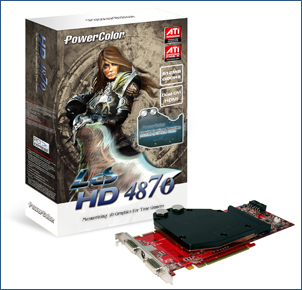
PowerColor LCS HD4870 has a full water block mounting on the card, fully covering memory and power regulator chip. With copper based design, it is able to reduce temperature efficiently. Furthermore, PowerColor package includes high-flow 3/8" and 1/2" fittings (barbs) to maximize water flow with captured o-rings to prevent leakage. Gamers can easily build up their own liquid cooling system using these two fittings.Compatible with all essential features, PowerColor LCS HD4870 allows overclcokers to maximize core and memory speed to 800MHz and 950MHz (3.8Gbps), frees up a dazzling performance in the silent and cool operating environment. The retail price of LCS HD4870 is USD$369.
It's nice to see PowerColor including a quality water block such as the EK with the HD 4870. It'd be even sweeter if they adopted this approach with the HD 4870 X2'.
PowerColor LCS HD 4870 press release can be found here
Discuss this press release in our forum
Most Recent Comments
Ooops. Last time I got that was from an interrupted update. Only resolution was to reinstall.
Maybe times have changed, but I did search a fair bit at the time. Think there was one resolution that involved changing a load of registry things, changing permissions on some files (that didnt work), but ultimately failed.
I had that problem crop up at work a few weeks back when I was creating an image. You could try a system restore back to the point before the interrupted update. Sorted it for me.
try this link
http://forums.microsoft.com/TechNet/ShowPost.aspx?PostID=3438479&SiteID=17
microsoft errors are so common that you can easly type for example "error 80070424" and mostly you will have answer in 20 sec
http://forums.microsoft.com/TechNet/ShowPost.aspx?PostID=3438479&SiteID=17
microsoft errors are so common that you can easly type for example "error 80070424" and mostly you will have answer in 20 sec
Please try the following:
Click Start >> Run >>
Type the follow command in the Open box.
"net.exe stop wuauserv" (w/o quotes)
Press Ok
Repeat the same for the following commands:
regsvr32.exe wuapi.dll
regsvr32.exe wups.dll
regsvr32.exe wuaueng.dll
regsvr32.exe wucltui.dll
regsvr32.exe MSXML3.dll
regsvr32.exe qmgr.dll
regsvr32.exe qmgrprxy.dll
net.exe start wuauserv
Restart the machine and try again.
The thanks goes out to these people http://forums.techarena.in/windows-update/243060.htm
Click Start >> Run >>
Type the follow command in the Open box.
"net.exe stop wuauserv" (w/o quotes)
Press Ok
Repeat the same for the following commands:
regsvr32.exe wuapi.dll
regsvr32.exe wups.dll
regsvr32.exe wuaueng.dll
regsvr32.exe wucltui.dll
regsvr32.exe MSXML3.dll
regsvr32.exe qmgr.dll
regsvr32.exe qmgrprxy.dll
net.exe start wuauserv
Restart the machine and try again.
The thanks goes out to these people http://forums.techarena.in/windows-update/243060.htm
(holding a bunch of reps in reserve for when SwaleSmith comes back and says it worked)
LoL,
System Restore Done The Trick Thanks Everyone :D
LoL,
System Restore Done The Trick Thanks Everyone :D
;)


internet etc etc works fine, good old windows again...:rolleyes:
p.s running vista 64bit ultimate and connecting using wifi