Published: March 29, 2007 |
Source:
VR-Zone |
Author:
Matthew Fogg
abit’s latest Fatal1ty Motherboard Offering
News Posted 29/03/07
Author: PV5150
Source: VR-Zone

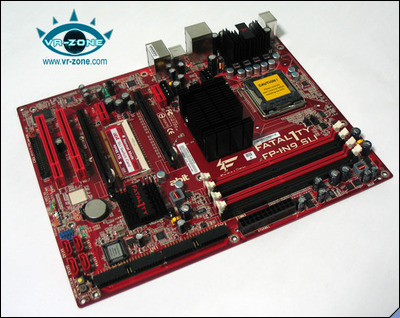
It appears that abit are pushing their Fatal1ty range of motherboards now just as much as their Max series. Although, the Fatality Line of Motherboards are targeted mainlytowards gamers who are more budget conscious. One of the latest additions to the Fatality range is the Abit FP-IN9 SLI Motherboard, based on the NVIDIA 650i SLI Chipset, and capable of running x8 x8 SLI Dual Graphics Card configuration.
| CPU |
|
Supports LGA775 Intel® Core™2 Duo, Core™2 Quad, Core™2 Extreme, Pentium® Dual-Core, Pentium® Extreme Edition, Pentium® D & Pentium® 4 Processors with 1066/800MHz FSB |
| Chipset |
|
NVIDIA® nForce® 650i SLI™ |
| Form Factor |
|
ATX form factor 305 x 245mm
PCB Color: Red
|
| Memory |
|
4 x 240-pin DIMM sockets support max. memory capacity 32GB
Supports Dual channel DDR2 800/667/533 Un-buffered Non-ECC memory |
| LAN |
|
Native Gigabit Ethernet controller supports 10/100/1000Mbit LAN connections |
| Audio |
|
7.1 CH HD Audio CODEC
Supports Auto Jack Sensing and optical S/PDIF Out |
| Expansion Slots |
|
2 x PCI-E X16, 2 x PCI-E X1, 2 x PCI |
| Internal I/O |
|
1 x Floppy Port supports up to 2.88 MB
2 x ATA 133/100/66/33 IDE connectors
4 x SATA 3Gb/s connector
2 x USB header (supports 4 additional ports)
1 x FP-Audio
Quick Power On & Reset buttons
|
| Back Panel I/O |
|
1 x PS/2 Keyboard, 1 x PS/2 Mouse
1 x S/P DIF Out
7.1 CH Audio connector (Front, Line-in, MIC-in, Center/Subwoofer, Surround, Rear Surround)
4 x USB 2.0, 1 x RJ-45 LAN connector
|
| Serial ATA |
|
NVIDIA® NF430: 4 x SATA 3Gb/s supports NVIDIA® MediaShield™ RAID with SATA RAID 0/1/0+1/5 and JBOD
Supports AHCI, NCQ |
| Voltages |
|
VCore up to 1.7V
VDIMM up to 2.5V
VNB up to 1.58V
VTT up to 1.65v |
|
Fire engine red and black theme anyone?
Discuss in our forum




