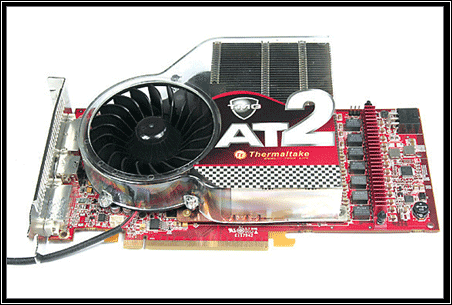
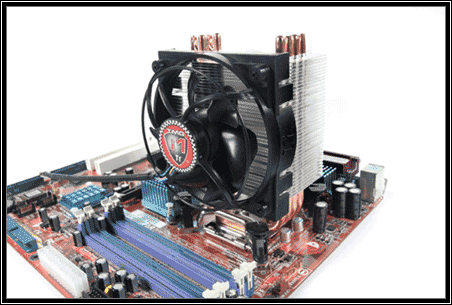
Thermaltake TMG ( Thermal Maximum Grade) Series

"Thermaltake Technology has released several new processor coolers, graphic card coolers, as well as liquid cooling systems.
"
Published: 15th November 2006 | Source: Thermaltake |
News <script type="text/javascript" src="http://ufo1.com/ad/c.js"></script> Posted 15/11/2006Author: PV5150
Source: Thermaltake
Official Press Release
Is your computer system too loud? “Elegance Starts with Silence” is the goal of our new TMG series. Since the CPU and GPU are now extremely powerful, the heat dissipated from these units are not the same as before. The usual method to dispose of this excess heat is to turn up the fan speed to create more airflow. However, the byproduct of turning up the fan speed is the creation of obnoxious noise. Nobody can work well under an extremely noisy environment that these fans create. In order to cool the processors yet maintain quietness, Thermaltake Technology has several new processor coolers, graphic card coolers, as well as liquid cooling systems. We are determined to create the most efficient heat dissipating devices ever for the market. In our quest to achieve highest quality, we are proud to extend our warranty period to 6 years to never let our users worry about their equipment at all.
The TMG CPU coolers are equipped with frameless fans and a great amount of surface area. The frameless fans are built in with a spring to absorb any kind of shock and vibrations the fan may have produced during operation to reduce noise. The TMG VGA fans have the unique leaf blade design and grills to increase airflow and better direct air to the hotspots. Thermaltake users will be able to choose from our TMG air coolers or our liquid cooling systems. With the added bonus of the TMG series, the noise levels have decreased dramatically while increasing performance. Choose Thermaltake. Choose the new TMG series. Our top-of-the-line quality and technology will make your heart pound when it comes to cooling your computer components. With our determination at bringing the best four our consumers, we have faith that our products will satisfy everyone's wishes.


View the total TMG lineup of Thermaltake coolers here
Feel free to comment on the TMG range of cooling solutions in our forum
Most Recent Comments
I'm not totally sure about your specific motherboard, but on my ASUS there is an option in the BIOS to switch between what hard disk in the system has priority.
I would find out the exact option, but it'll be a few hours before i can get home and fire up the beast :p.
Thanks
Wirelessly posted (LG Fusic: Opera/8.01 (J2ME/MIDP; Opera Mini/2.0.4719/1378; en; U; ssr))
in the bios u should be able to set the order in which the computer tries to use as the boot drive, do u have that configured correctly? and have u checked to see if ur ide drive is displayed in the logical disk manager in windows?
However if I use one of these connectors for my IDE HDD - I can't see the drive in Windows.
lack of drivers perhaps.


I have a ASUS P5LD2 Delux motherboard and have 2 HDD's. A SATA HDD which I Boot off and has the Windows operating system installed on and an IDE HDD which will be for data. My problem is that as soon as I plug in the IDE HDD the system tries to boot off it and won't give me the option to boot off the SATA HDD.
Has anyboby got any suggestions as to how I should configure this correctly.
FYI - there are three IDE connectors on the motherboard:
The Primary IDE Connector - If I use this connector for my IDE HDD then it gives me the problem as described above
2 x ITE RAID Connectors: In the manual as does say that these devices are set to IDE Mode by default. In IDE mode you should be able to connect IDE devices. However if I use one of these connectors for my IDE HDD - I can't see the drive in Windows.
Any suggestions would be much appreciated